I2V AI for realistic portraits refers to the process of converting a static portrait image into a lifelike video using image-to-video AI technology. Instead of relying on traditional filming methods, you can take a high-quality portrait and transform it into a speaking, expressive character that looks natural and believable. The focus here is not just animation, but realism—ensuring that facial movements, lip sync, and expressions closely match how a real person would appear on camera.
In 2026, this approach has become increasingly important for creators who want to produce professional-looking videos without actually recording themselves. Whether it’s for faceless YouTube channels, educational content, brand storytelling, or digital personas, realistic portrait animation helps bridge the gap between automation and authenticity. Viewers are more likely to engage with content that feels human, even if it’s AI-generated.
When using I2V AI for realistic portraits, the goal is to create a digital version that maintains natural motion, accurate lip synchronization, and subtle expressions. This requires not only a good input image but also a structured workflow that ensures each element—visuals, voice, and script—is optimized. Platforms like Zoice make this possible by organizing the process into clear steps, allowing creators to produce high-quality results consistently.
Why Use I2V AI For Realistic Portraits?
One of the primary reasons to use this method is to achieve a high level of realism without traditional video production. Unlike basic animations, realistic portrait videos aim to replicate natural human behavior, which makes the content more engaging and trustworthy.
Another major advantage is consistency. When you create a realistic AI portrait, you can reuse it across multiple videos while maintaining the same appearance and style. This helps build a strong visual identity and ensures that your content feels cohesive over time.
This approach also improves efficiency. Instead of recording multiple takes or editing footage, you can generate videos by simply updating your script or voice. This significantly reduces production time while maintaining professional quality.
Flexibility is another key benefit. You can experiment with different tones, expressions, and content styles without needing to re-record anything. If you want to adjust the delivery, you can modify the script or voice settings and regenerate the video.
Additionally, it reduces the dependency on equipment and setup. There’s no need for cameras, lighting, or editing tools. Everything is handled through AI, making it accessible for creators at any level.
Steps to Create I2V AI For Realistic Portraits Using Zoice
Before starting, it’s important to understand that achieving realism depends on three main components: a high-quality portrait, a well-matched voice, and proper expression settings. Zoice structures the workflow in a way that allows you to control each of these elements effectively.
Step 1 – Log into Zoice Dashboard
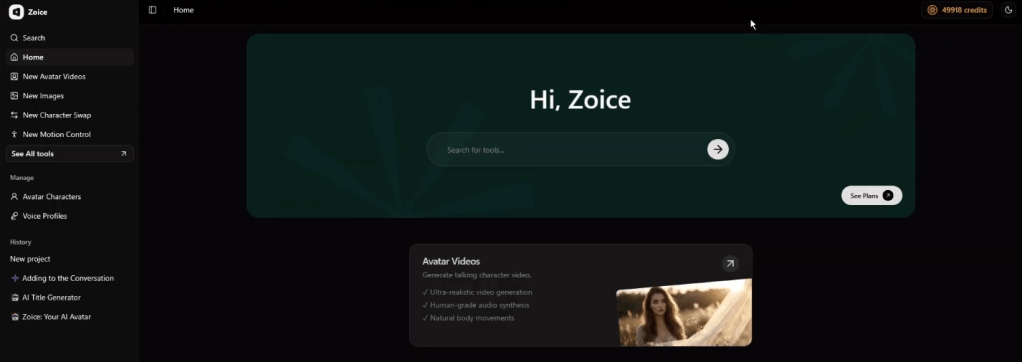
Begin by logging into your Zoice account. The dashboard is your central workspace where you can access avatar creation, voice profiles, and video generation tools. Take a moment to understand the layout so you can move through each step efficiently.
Step 2 – Navigate to Avatar Characters
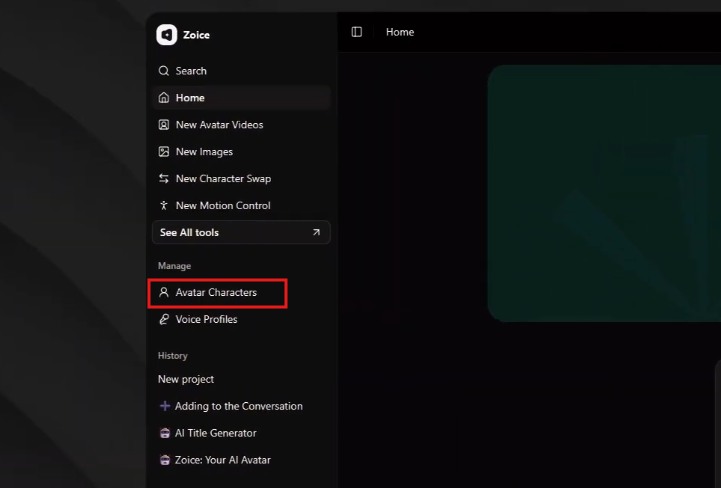
From the left sidebar, click on Avatar Characters. This section allows you to create and manage portrait-based avatars that will be used in your videos.
Step 3 – Click on Create New
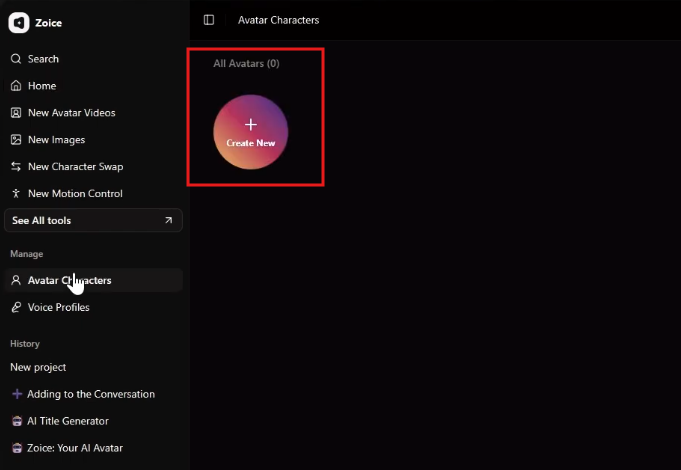
Select the Create New option to begin the process. This will open the avatar creation interface where you can upload your portrait and configure initial settings.
Step 4 – Upload a High-Quality Portrait
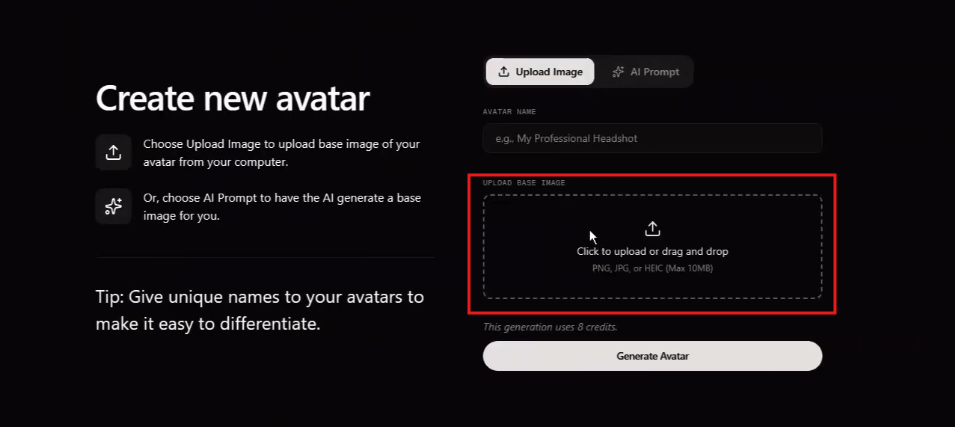
Choose the Upload Image option and select a high-resolution portrait. For realistic results, the image should be front-facing, well-lit, and clear. Avoid images with heavy shadows, filters, or obstructions, as these can reduce the quality of animation.
Step 5 – Name Your Avatar

Assign a name to your avatar so you can easily identify it later. This is especially useful if you plan to create multiple realistic characters for different types of content.
Step 6 – Generate the Realistic Avatar
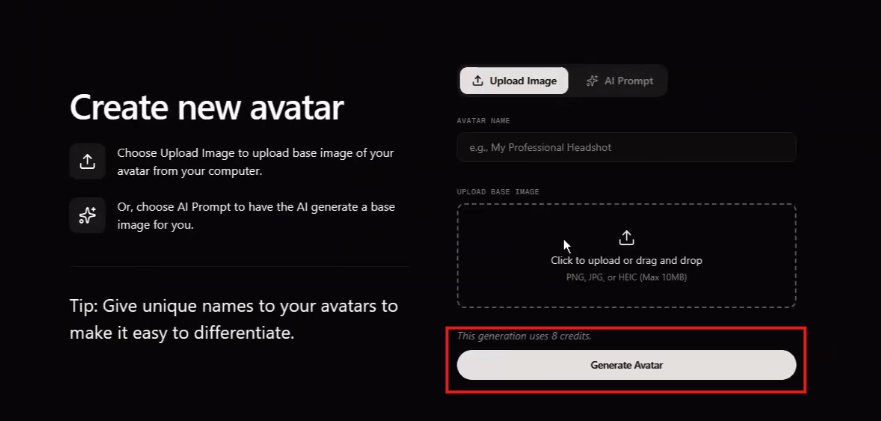
Click Generate Avatar and allow Zoice to process your image. During this step, the platform analyzes facial features in detail and prepares the avatar for realistic animation, including subtle movements and accurate lip sync.
Step 7 – Navigate to Voice Profiles
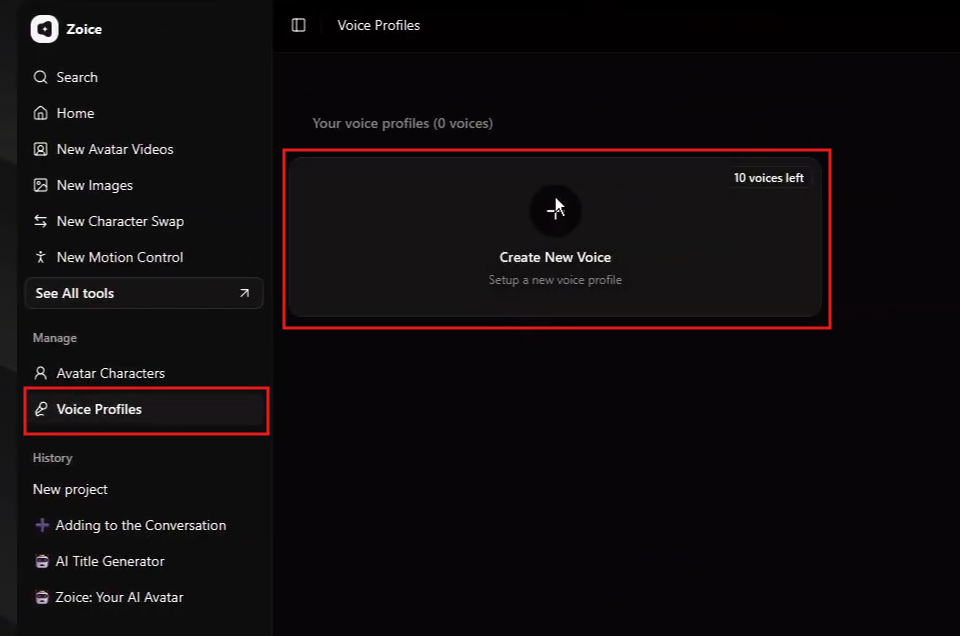
Once your avatar is ready, go to the Voice Profiles section. This is where you define how your realistic portrait will sound.
Step 8 – Upload or Create a Natural-Sounding Voice
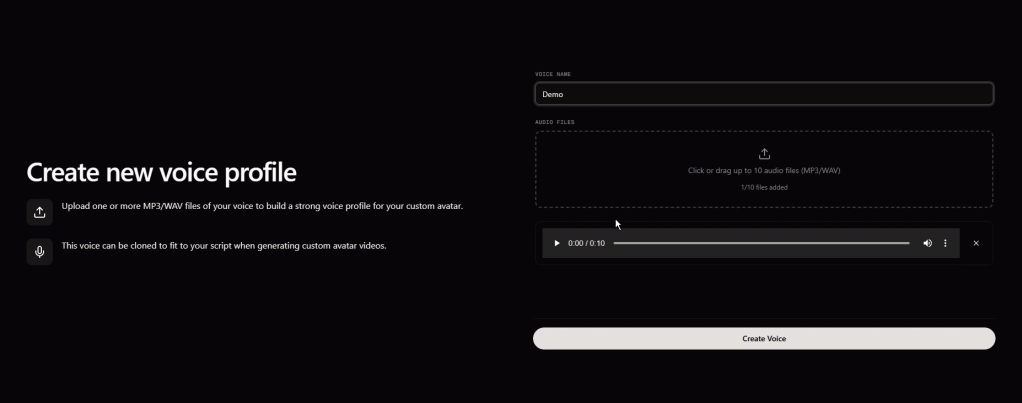
You can upload a voice sample or choose an AI-generated voice. For realistic results, select a voice that matches the personality and tone of the portrait. Clear pronunciation and natural pacing will improve the overall output.
Step 9 – Open New Avatar Videos
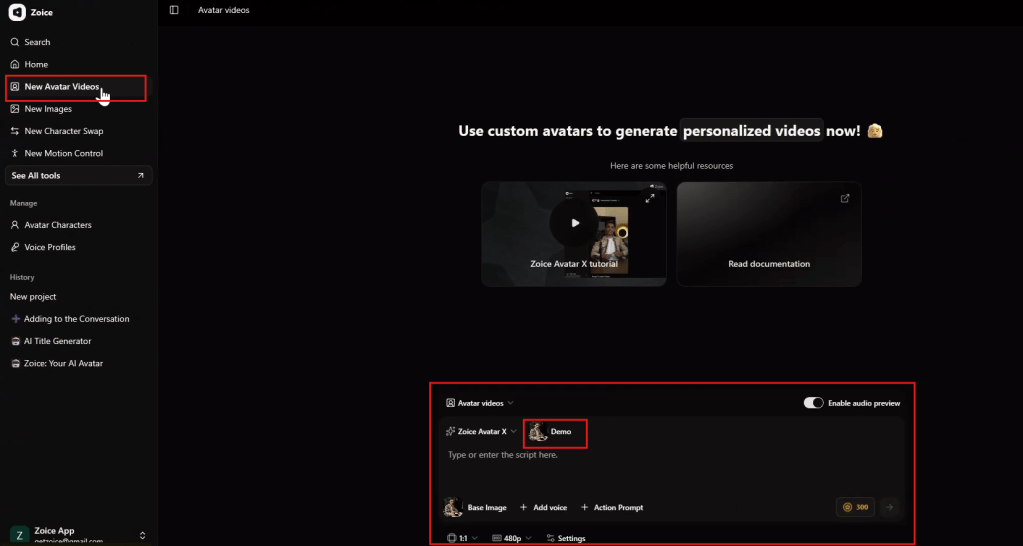
Navigate to New Avatar Videos to begin creating your video. This is where you combine your avatar, voice, and script into a complete output.
Step 10 – Add Script with Natural Flow
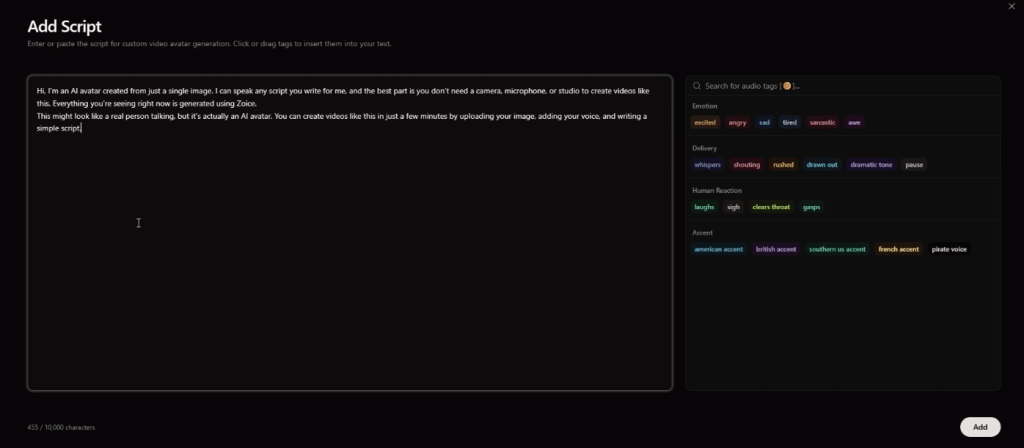
Enter your script into the text field. For realism, write your script in a conversational tone rather than a robotic or overly formal style. Natural language helps the AI generate better expressions and lip movements.
Step 11 – Adjust Expressions and Subtle Reactions
Fine-tune emotional tones and reactions to match the script. Realistic videos often rely on subtle expressions rather than exaggerated movements, so adjust settings carefully to maintain a natural look.
Step 12 – Select Voice Profile
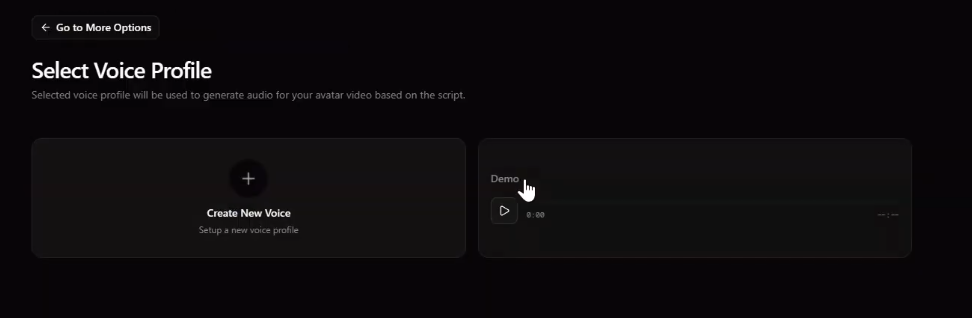
Choose the voice profile you created earlier. This ensures that the avatar’s lip movements are accurately synchronized with the selected voice.
Step 13 – Configure Video Settings
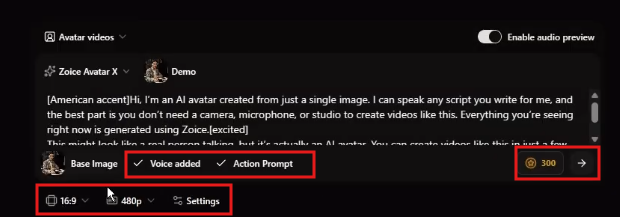
Adjust video settings such as resolution, format, and aspect ratio. Higher resolution settings are recommended for realistic portraits, as they preserve details and improve visual quality.
Step 14 – Generate Final Video
Click Generate to create your video. Zoice will process your inputs and produce a realistic portrait video with synchronized voice, natural expressions, and smooth animation.
Conclusion
I2V AI for realistic portraits has redefined video creation in 2026 by making it possible to produce lifelike content without traditional filming. It allows creators to maintain a human-like presence while benefiting from the speed and scalability of AI.
By combining a high-quality portrait, a natural voice, and a well-structured script, you can create videos that feel authentic and engaging. This approach is particularly valuable for faceless content, professional presentations, and scalable video strategies.
Zoice provides a structured workflow that ensures each element is optimized for realism. From avatar creation to final video generation, every step is designed to help you achieve high-quality results consistently.
For creators who want to balance automation with authenticity, I2V AI for realistic portraits offers a powerful and practical solution.
FAQs
What is I2V AI for realistic portraits?
It is the process of converting a static portrait into a realistic video using AI, with natural facial movements and synchronized voice.
How can I make my AI portrait look more realistic?
Use a high-quality image, choose a natural-sounding voice, and keep expressions subtle and aligned with the script.
Do I need professional equipment for this?
No, you only need a good portrait image and a voice setup. The AI handles the rest.
Can I reuse the same portrait for multiple videos?
Yes, once created, the same avatar can be used across multiple videos with different scripts.
Is this suitable for professional content?
Yes, realistic portrait videos are widely used for educational, marketing, and business content.
Why use Zoice for realistic portrait videos?
Zoice offers advanced facial animation, voice customization, and a structured workflow that helps create high-quality, realistic videos efficiently.
 AI Avatar
Leave a comment