Photos have always been a powerful way to tell stories, but AI has completely changed how static images can be used online. In 2026, creators can now turn ordinary pictures into animated speaking videos with realistic facial movement, synchronized lip motion, and natural voice delivery. Instead of being limited to still visuals, a single image can now become a dynamic digital presenter for videos, tutorials, marketing campaigns, or entertainment content.
The growing popularity of talking picture technology comes from its simplicity. You no longer need cameras, actors, microphones, or advanced editing software to create engaging videos. With AI-powered platforms like Zoice, users can upload a photo, add a script or voice recording, and generate a realistic talking video within minutes.
Talking picture videos are now widely used for YouTube content, educational explainers, social media storytelling, AI influencers, virtual customer support, online learning, and digital branding. Since the workflow is fast and scalable, creators can produce content consistently without spending hours on traditional production.
Why People Use Talking Pictures
One of the biggest reasons people create talking pictures is content speed. Recording videos manually often takes time because of filming, retakes, lighting adjustments, and editing. AI automation simplifies this entire process by turning a static image into an animated speaking character.
Another reason is accessibility. Many creators feel uncomfortable appearing on camera regularly. Talking picture technology allows them to maintain a digital presence without constantly recording themselves.
Businesses also use talking photos for customer engagement. Animated presenters are often more interactive and visually appealing than static graphics or text-based presentations. This can improve audience retention across social media and marketing campaigns.
Talking pictures are also useful for multilingual content creation. Once the avatar is generated, creators can easily change scripts and voices to produce localized videos for different audiences.
Steps to Make Picture Talk Using Zoice
Zoice uses an AI-based workflow that combines image animation, voice synchronization, and facial expression generation to create realistic talking videos.
Step 1 – Access Your Zoice Dashboard
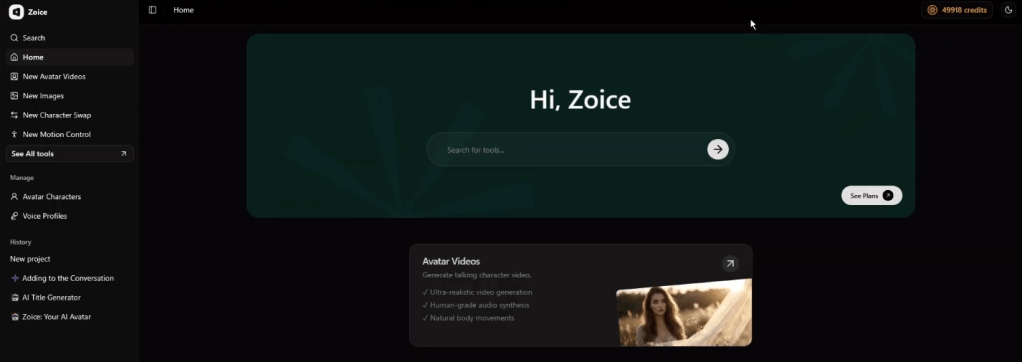
Log into your Zoice account and open the main dashboard. This is where you can manage avatars, voice profiles, and AI video projects.
Step 2 – Open Avatar Characters
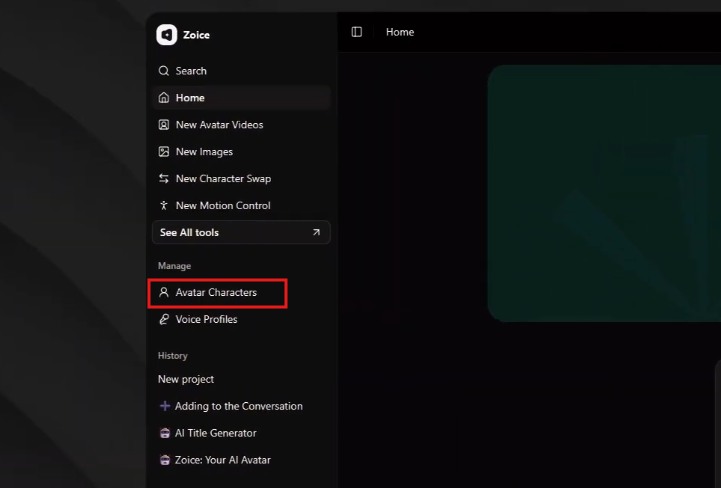
Navigate to the Avatar Characters section from the sidebar menu. This area stores all image-based avatars used for talking video creation.
Step 3 – Start a New Avatar Project
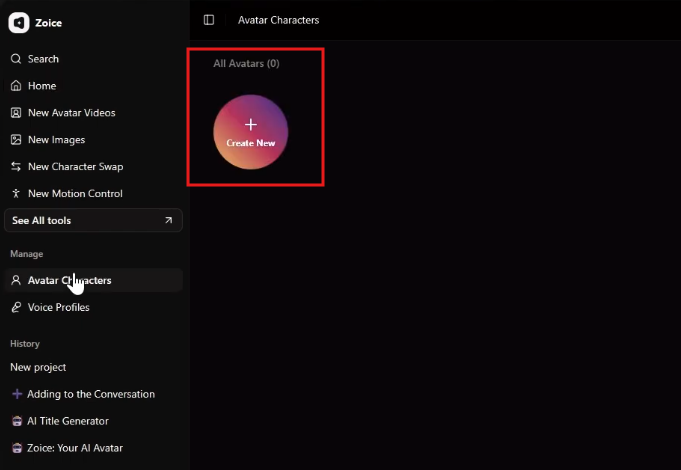
Click Create New to begin setting up your talking picture project. Zoice will open the avatar generation interface.
Step 4 – Upload the Picture
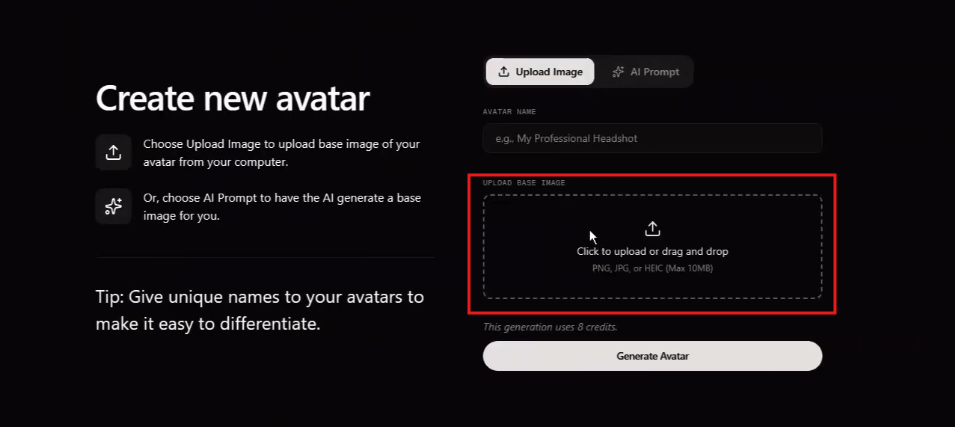
Upload a clear image with visible facial details. Front-facing photos with good lighting generally produce better facial tracking and smoother animation results.
Step 5 – Create an Avatar Identity

Add a recognizable name for the avatar. This helps organize multiple characters if you plan to create several AI presenters later.
Step 6 – Process the Avatar
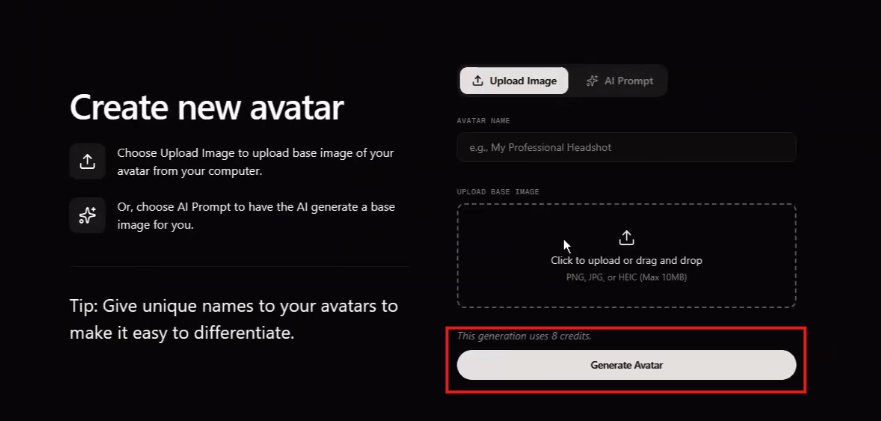
Select Generate Avatar to allow the AI system to analyze the image. Zoice maps facial structures, detects motion points, and prepares the picture for animation.
Step 7 – Configure Voice Settings
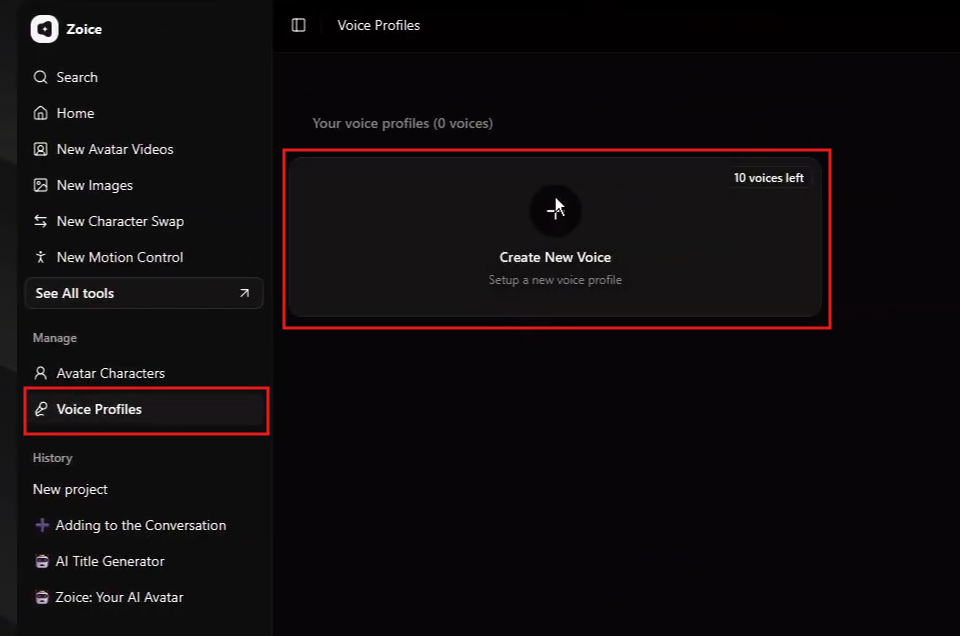
Go to the Voice Profiles section to choose how the avatar will sound. You can upload your own voice or select an AI-generated voice model.
Step 8 – Save the Voice Profile
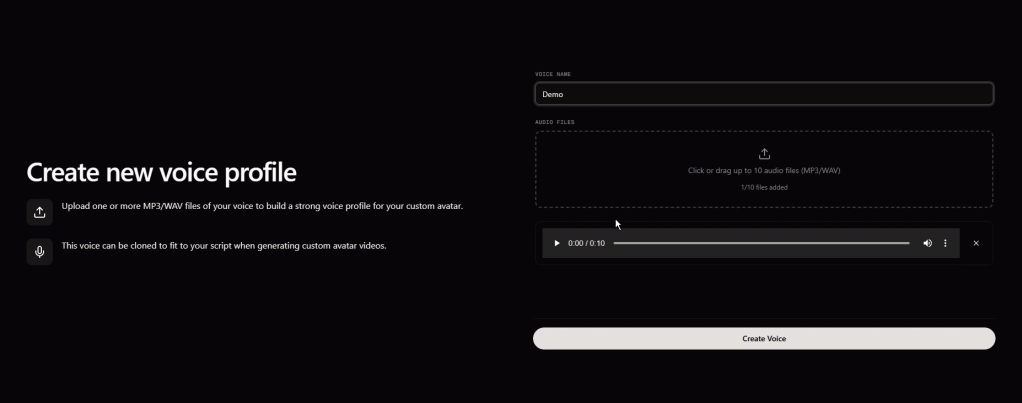
After generating the voice, save it as a reusable profile. This helps maintain consistency across future talking picture videos.
Step 9 – Create a New Talking Video
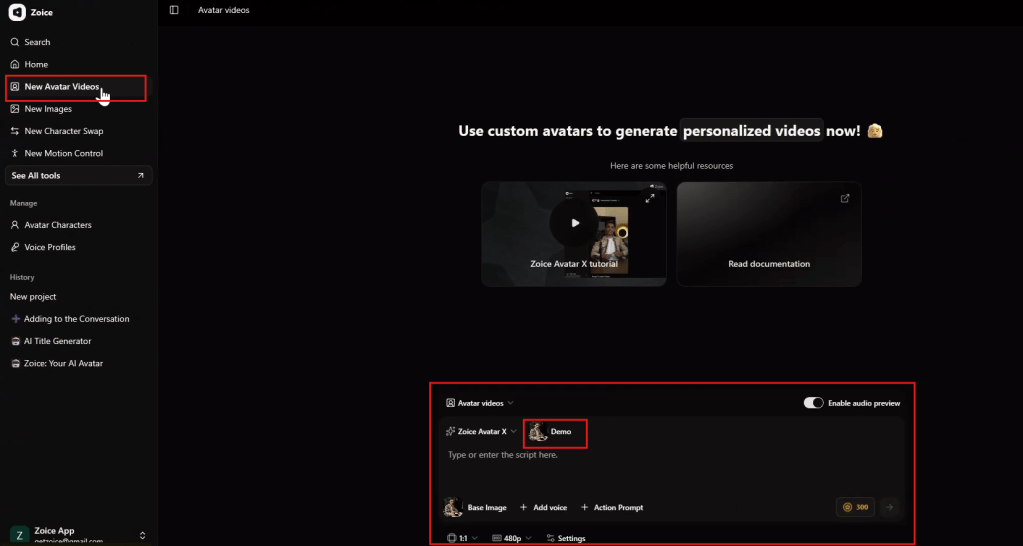
Open the New Avatar Videos section to begin combining the avatar, voice, and script into a complete AI video.
Step 10 – Add Dialogue and Expressions
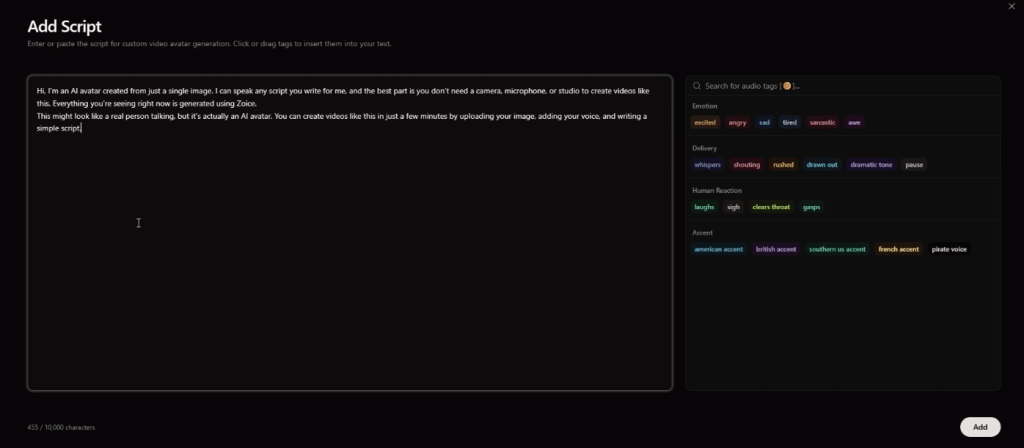
Enter the script your avatar will speak. You can also adjust emotional reactions such as excitement, seriousness, friendliness, or confidence to match the video tone.
Step 11 – Link the Voice Profile
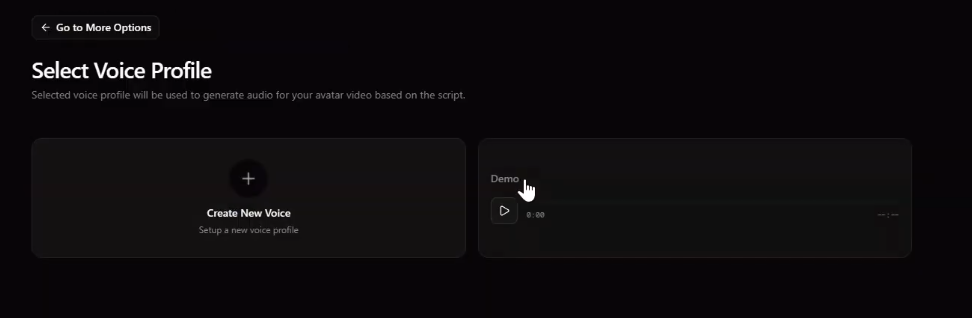
Choose the saved voice profile for the project. This synchronizes speech with facial animation and lip movement.
Step 12 – Adjust Video Format Settings
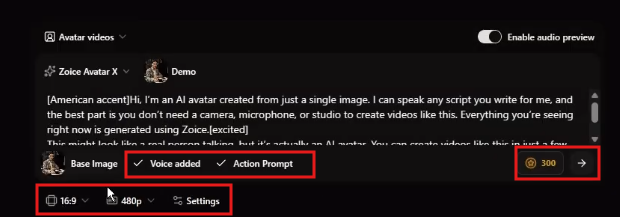
Select your preferred video format and resolution. Horizontal videos work well for YouTube, while vertical layouts are ideal for TikTok and Instagram Reels.
Step 13 – Generate the Final Video
Click Generate to create the finished talking picture video. Zoice will process facial animation, lip synchronization, expressions, and rendering automatically.
Tips for Better Talking Picture Videos
Image quality directly affects animation realism. Photos with strong lighting, sharp facial visibility, and minimal blur usually generate better movement and expression tracking.
Natural speech patterns also improve results. Scripts written conversationally tend to sound more realistic when converted into AI-generated voice output.
If possible, use high-quality voice recordings with minimal background noise. Clear audio improves synchronization accuracy and overall realism.
Creators should also match facial expressions with the tone of the script. Serious topics generally work better with subtle movements, while energetic content benefits from more expressive animation.
Finally, optimize video dimensions based on your publishing platform. Short-form vertical videos perform especially well on modern social platforms.
Common Use Cases for Talking Pictures
Talking picture technology is now used across many industries and content categories. Social media creators use it to produce AI storytelling videos and character-based content. Businesses use animated avatars for product explainers and customer onboarding.
Educators create interactive lessons using talking historical figures or animated instructors. Marketing teams generate branded spokesperson videos without hiring actors or filming repeatedly.
Content creators also use talking pictures for faceless YouTube channels, AI influencer pages, motivational videos, language-learning content, and entertainment clips.
Conclusion
Talking picture technology has changed how digital videos are created in 2026. Instead of relying on cameras, production teams, and complex editing software, creators can now generate engaging speaking videos directly from static images.
With platforms like Zoice, the entire workflow becomes simple and scalable. Users can upload a photo, configure voice settings, write a script, and generate realistic talking videos within minutes.
Whether you are building a personal brand, growing a YouTube channel, creating educational content, or producing social media campaigns, talking pictures provide a fast and efficient way to create engaging AI-powered videos.
FAQs
What does it mean to make a picture talk?
It means using AI to animate a static image so the person in the photo appears to speak naturally. The system synchronizes facial movement, lip motion, and voice automatically.
Do I need professional editing skills to create talking pictures?
No, most AI platforms simplify the entire workflow. Users can generate talking videos without learning advanced animation or video editing software.
What type of picture gives the best animation results?
Clear front-facing images with good lighting usually produce the most realistic results. Photos with sharp facial visibility help the AI track expressions more accurately.
Can I use my own voice for the talking picture?
Yes, many AI platforms allow you to upload custom voice recordings. This helps create more personalized and authentic talking videos.
Are talking picture videos useful for business content?
Yes, businesses use them for tutorials, onboarding, product marketing, and customer engagement. Animated presenters often increase viewer attention compared to static content.
Why do creators use Zoice for talking picture videos?
Zoice combines facial animation, voice synchronization, and AI rendering into one workflow. This makes it easier to create realistic talking videos quickly and efficiently.


Leave a Reply